Designing advice dialogs
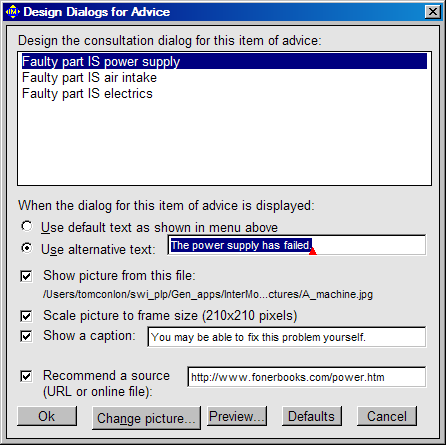
When you select from the 'Build' menu the 'Design advice' command, you get this dialog:
When the dialog is completed as shown, the 'Run' menu's 'Consult' command displays the window shown here if the advice is validated. This example comes from the file 'Diagnosis_rules.imo' which you will find in the 'Examples' folder.
Fill the dialog with information to get the display that you want for your model's startup. If you choose to add one of your own picture files, be sure it is a JPEG (*.jpg) file or a file in some other format that is understood by InterModeller.
The 'Preview' button is handy to let you see how the result will look while trying out the 'Scale picture' option and other settings.
After you've made a dialog for an item of advice, you ought not to change the text of the advice in the original model or the dialog settings will be lost. Instead, edit the field in the dialog that specifies 'alternative' text.